u::Lux insider tip: improve the display brightness

Two steps to quickly and easily optimise the brightness of your display!
Usually, room control units should be mounted to the wall at a height of 1,45 m. Also u::Lux gives this clear recommendation - the mentioned mounting height ensures the optimum view-ability of the user interface on the colour graphic display of your u::Lux Switch.
Well, what can be done if for structural reasons the height of 1,45 m can’t be achieved? Maybe because you want to insert the u::Lux Switch into already existing lower standard switch outlets? Or because also children should be able to reach the device?
In this case the viewer looks down to the display at a too steep angle and the user interface may seem too dark. Fortunately, there is a simple trick to make your display content brighter in just two steps:
1. TURN THE SWITCH 180°
Simply insert the u::Lux Switch into the switch outlet rotated by 180°. Now microphone and brightness sensor (the four slots on both sides) are ABOVE the display and not any more BELOW.
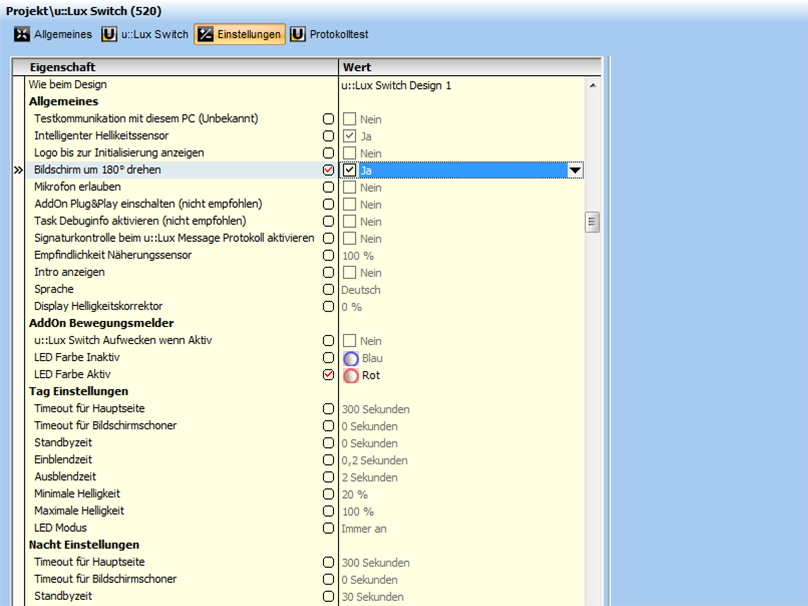
2) CONFIGURE BY MOUSE-CLICK
Then in the "u::Lux Config" please select the relevant switch or the design, click on "Settings" on the right and mark the option "Rotate screen 180°" with "Yes".
If you use the control of one of our partners iBricks or Comexio, you'll do the adjustment directly through the respective configuration software.
You will see - this will improve the view-ability of your user interface in no time. If questions arise we will be pleased to help you.
Your u::Lux team
u::Lux GmbH
Rechtes Salzachufer 42
5020 Salzburg
E-Mail: office@u-lux.com
Tel.: +43/662/450351-0